Every program below runs as shown: tools/vios_manual.py examples evaluates
each Forth block of this chapter in order on a host build of VIOS, so the
programs are checked whenever the manual is rebuilt. Type them at the
console, paste them into the Workspace and use do it (Ctrl+D), or save
them in a module with the Browser so they survive a reboot (see
Modules and Persistence).
Classics: FizzBuzz, a prime sieve, recursion
Plain Forth: loops, conditionals, data space and recursion.
: FIZZBUZZ ( n -- )
  1+ 1 ?DO
    I 15 MOD 0= IF ." FizzBuzz "
    ELSE I 3 MOD 0= IF ." Fizz "
    ELSE I 5 MOD 0= IF ." Buzz "
    ELSE I . THEN THEN THEN
  LOOP CR ;
20 FIZZBUZZ
1 2 Fizz 4 Buzz Fizz 7 8 Fizz Buzz 11 Fizz 13 14 FizzBuzz 16 17 Fizz 19 BuzzThe sieve of Eratosthenes keeps one flag byte per number in a buffer made
with CREATE and ALLOT. The inner loop steps by
the prime with +LOOP; J is the outer loop's index.
200 CONSTANT LIMIT
CREATE FLAGS LIMIT ALLOT
: SIEVE ( -- )
  FLAGS LIMIT 1 FILL
  LIMIT 2 DO
    FLAGS I + C@ IF
      I DUP * LIMIT < IF
        LIMIT I DUP * DO 0 FLAGS I + C! J +LOOP
      THEN
    THEN
  LOOP ;
: PRIMES ( -- ) SIEVE LIMIT 2 DO FLAGS I + C@ IF I . THEN LOOP CR ;
PRIMES
RECURSE calls the word being defined. Cells are 24 bits on
the board, so 10 FACTORIAL (3628800) is the largest factorial that fits;
11 FACTORIAL wraps around.
: FACTORIAL ( n -- n! ) DUP 2 < IF DROP 1 ELSE DUP 1- RECURSE * THEN ;
: FIB ( n -- fib ) DUP 2 < IF EXIT THEN DUP 1- RECURSE SWAP 2 - RECURSE + ;
10 FACTORIAL .  20 FIB . CR
3628800 6765A pipeline filter: cat | nl
This program is the Forth version of the Unix command cat poem.txt | nl.
One task reads a file and prints it; a second task numbers the lines it
receives on its KEY input. PIPELINE joins the two with a
pipe, so neither word knows about the other: CAT-POEM just prints, NL
just reads KEY until it returns -1 (end of input).
\ Build a small file to read back, line by line.
CREATE POEM 128 ALLOT   VARIABLE POEM-LEN
: +BYTE ( c -- ) POEM POEM-LEN @ + C!  1 POEM-LEN +! ;
: +LINE ( addr u -- ) 0 DO DUP I + C@ +BYTE LOOP DROP  13 +BYTE 10 +BYTE ;
S" Roses are red," +LINE
S" Violets are blue," +LINE
S" Forth on the Agon" +LINE
S" Is waiting for you." +LINE
S" /VIOS/POEM.TXT" POEM POEM-LEN @ FILE-WRITE DROP

\ Producer: copy a file to standard output.
CREATE CAT-BUF 64 ALLOT
VARIABLE CAT-H
: CAT-POEM ( -- )
  S" /VIOS/POEM.TXT" 1 OPEN CAT-H !
  BEGIN CAT-BUF 64 CAT-H @ READ  DUP 0 > WHILE  CAT-BUF SWAP TYPE  REPEAT
  DROP  CAT-H @ CLOSE DROP ;

\ Filter: number each line of standard input.
VARIABLE LINE#   VARIABLE FRESH
: NL ( -- )
  1 LINE# !  TRUE FRESH !
  BEGIN KEY DUP -1 <> WHILE
    FRESH @ IF  LINE# @ .  1 LINE# +!  FALSE FRESH !  THEN
    DUP EMIT  10 = IF TRUE FRESH ! THEN
  REPEAT DROP ;

' CAT-POEM ' NL PIPELINE 2DROP
1 Roses are red,
2 Violets are blue,
3 Forth on the Agon
4 Is waiting for you.The numbered lines appear on the console as soon as it is idle. Both tasks
end on their own: when CAT-POEM returns, VIOS closes the pipe's write end
that the task owned, NL's KEY returns -1 and NL returns too. Any word
that reads KEY until -1 and prints its result is a filter you can put on
the right-hand side of PIPELINE; any word that prints can go on the left.
The poem is built in memory first because a S" string ends at the end of
its line.
A background clock
A task that counts seconds with MS and a word that shows the time.
The task sleeps between ticks, so it costs almost nothing, and the console
stays free while it runs. Because the task only updates a variable, it never
prints in the middle of your typing.
VARIABLE SECONDS
: CLOCK ( -- ) BEGIN 1000 MS  1 SECONDS +!  AGAIN ;
: .2 ( n -- ) 10 /MOD  48 + EMIT  48 + EMIT ;
: .TIME ( -- ) SECONDS @ 60 /MOD  .2 ." :" .2 CR ;

' CLOCK SPAWN CONSTANT CLOCK-ID
2100 MS
.TIME
CLOCK-ID TASK-STATE .
CLOCK-ID TASK-KILL
00:02
2TASK-STATE shows 2 (sleeping): the clock spends its life in MS. In a
real program you would not kill it; put CLOCK in a module and name a word
AUTORUN that spawns it, and the clock starts at every boot (see
Tasks and Preemption):
: AUTORUN ( -- ) ' CLOCK SPAWN DROP ;Two details: .2 prints a number from 0 to 99 as two digits with no
trailing space (48 is the character code of 0), and 60 /MOD leaves the
remainder (seconds) below the quotient (minutes).
A note-taker
NOTE adds a line to /VIOS/NOTES.TXT, NOTES shows them all, and
FORGET-NOTES deletes the file. SD files opened for writing are always
truncated, so to append, the program reads the whole file with
FILE-READ, adds the line in memory and writes it back with
FILE-WRITE. That limits the notebook to 4096 bytes, which
is plenty for notes.
CREATE NOTE-BUF 4096 ALLOT
VARIABLE NOTE-LEN
: NOTES-FILE ( -- addr u ) S" /VIOS/NOTES.TXT" ;
: READ-NOTES ( -- )
  NOTES-FILE NOTE-BUF 4096 FILE-READ  IF DROP 0 THEN  NOTE-LEN ! ;
: WRITE-NOTES ( -- )
  NOTES-FILE NOTE-BUF NOTE-LEN @ FILE-WRITE  IF ." note not saved: " FS-ERROR THEN ;
: ADD-BYTE ( c -- ) NOTE-BUF NOTE-LEN @ + C!  1 NOTE-LEN +! ;
: NOTE ( addr u -- )
  READ-NOTES
  DUP NOTE-LEN @ + 4094 > IF 2DROP ." notebook full" CR EXIT THEN
  >R  NOTE-BUF NOTE-LEN @ +  R@ MOVE  R> NOTE-LEN +!
  13 ADD-BYTE  10 ADD-BYTE  WRITE-NOTES ;
: NOTES ( -- ) READ-NOTES  NOTE-BUF NOTE-LEN @ TYPE ;
: FORGET-NOTES ( -- ) NOTES-FILE FILE-REMOVE DROP ;

S" buy milk" NOTE
S" back up the SD card" NOTE
NOTES
FORGET-NOTES
buy milk
back up the SD cardA missing file is not an error here: FILE-READ returns length 0 and
ior 1, and READ-NOTES turns that into an empty notebook. The notes
survive a restart because they are a file; the words do not, unless you keep
them in a module or in /VIOS/USER.FTH.
A jukebox
Three tunes stored on the ESP and a task that plays them one after another.
The tunes are played by the ESP; the task only starts each one and then
polls SOUND? every 50 ms until the voices are quiet.
: LOAD-TUNES ( -- )
  S" t120 l4 eefg gfed ccde e.d8d2 eefg gfed ccde d.c8c2" 0 TUNE
  S" t100 l8 o4 ccggaag4 ffeeddc4" 1 TUNE
  S" t180 w1 l16 o5 cegcegceg>c4" 2 TUNE ;
: WAIT-QUIET ( -- ) BEGIN 50 MS SOUND? 0= UNTIL ;
: PLAYLIST ( -- ) 3 0 DO  I 0 PLAY  WAIT-QUIET  300 MS  LOOP ;

LOAD-TUNES
' PLAYLIST SPAWN CONSTANT DJ
500 MS
DJ TASK-KILL  -1 STOP
PLAYLIST runs as a task, so the console stays usable while the music
plays; DJ TASK-KILL -1 STOP ends both the playlist and the current tune
(killing the task alone would let the current tune finish on the ESP).
Remove the last line to hear all three. To play one tune in a loop instead,
end its text with *.
A counter window
A window with a number from 0 to 100, a progress bar that follows it and three
buttons. It shows the usual shape of a GUI program in VIOS: one word builds the
window inside UI-BEGIN ... UI-COMMIT, one word reacts to a single event,
and a loop takes the waiting events every 20 ms until the window is closed.
- Window 2 shows surface 1; widget ids 10 to 16 are used (any ids below 40 are free for programs).
- The root box (10) stacks a label, the progress bar and a row box (13) with one empty row between them; the row box lays out the three buttons side by side.
N>Sturns a number into text, since the label needs a string.CHANDLEgets one decoded event( kind id arg )fromUI-NEXT: a button press (UI-EV-ACTIVATE) changes the value; a close request for the window (UI-EV-WINwhose low byte is 2, sent for Ctrl+W or Alt+F3) ends the loop.CSTEPhandles every event that is waiting and returns;COUNTERrepeats it.
\ Counter: a value from 0 to 100, a progress bar and three buttons.
2 CONSTANT CWIN   1 CONSTANT CSURF
VARIABLE CVAL   VARIABLE CDONE
CREATE NBUF 8 ALLOT   VARIABLE NLEN
: N>S ( u -- addr len )            \ unsigned decimal into NBUF
  8 NLEN !
  BEGIN 10 /MOD SWAP 48 +  -1 NLEN +!  NBUF NLEN @ + C!  DUP 0= UNTIL DROP
  NBUF NLEN @ +  8 NLEN @ - ;
: CSHOW ( -- )  CVAL @ N>S 11 UI-WTEXT   12 CVAL @ UI-WVALUE ;
: COUNTER-OPEN ( -- )
  UI-BEGIN
  CSURF 30 5 48 UI-SURFACE
  CWIN CSURF 200 64 30 5 UI-VISIBLE UI-DECOR OR UI-SHADOW OR UI-WINDOW
  S" Counter" CWIN UI-TITLE
  10 CWIN UI-BOX UI-NONE 0 0 0 0 UI-WF-FILL UI-WIDGET   10 UI-COLUMN 1 UI-LAYOUT
  11 CWIN UI-LABEL 10 0 0 0 0 0 UI-WIDGET      11 1 0 UI-WSIZE
  12 CWIN UI-PROGRESS 10 0 0 0 0 0 UI-WIDGET   12 1 0 UI-WSIZE
  13 CWIN UI-BOX 10 0 0 0 0 0 UI-WIDGET        13 1 0 UI-WSIZE   13 UI-ROW 1 UI-LAYOUT
  14 CWIN UI-BUTTON 13 0 0 0 0 0 UI-WIDGET     S" -10" 14 UI-WTEXT
  15 CWIN UI-BUTTON 13 0 0 0 0 0 UI-WIDGET     S" +10" 15 UI-WTEXT
  16 CWIN UI-BUTTON 13 0 0 0 0 0 UI-WIDGET     S" &Reset" 16 UI-WTEXT
  0 CVAL !  CSHOW
  CWIN UI-FOCUS
  UI-COMMIT ;
: CBUMP ( n -- )  CVAL @ +  0 MAX 100 MIN  CVAL !  CSHOW ;
: CHANDLE ( kind id arg -- )
  ROT DUP UI-EV-ACTIVATE = IF
    DROP DROP                                    ( id )
    DUP 14 = IF -10 CBUMP THEN
    DUP 15 = IF 10 CBUMP THEN
    16 = IF CVAL @ NEGATE CBUMP THEN  EXIT
  THEN
  UI-EV-WIN = IF                                 ( id arg )
    255 AND 2 =  SWAP CWIN =  AND IF TRUE CDONE ! THEN  EXIT
  THEN
  2DROP ;
: CSTEP ( -- )  BEGIN UI-NEXT WHILE CHANDLE REPEAT ;
: COUNTER ( -- )
  COUNTER-OPEN  FALSE CDONE !
  BEGIN CSTEP 20 MS  CDONE @ UNTIL
  CWIN UI-CLOSE ;
Start it from the console. Tab moves between the buttons, Space or Enter presses one, Ctrl+W closes the window and returns to the prompt:
COUNTER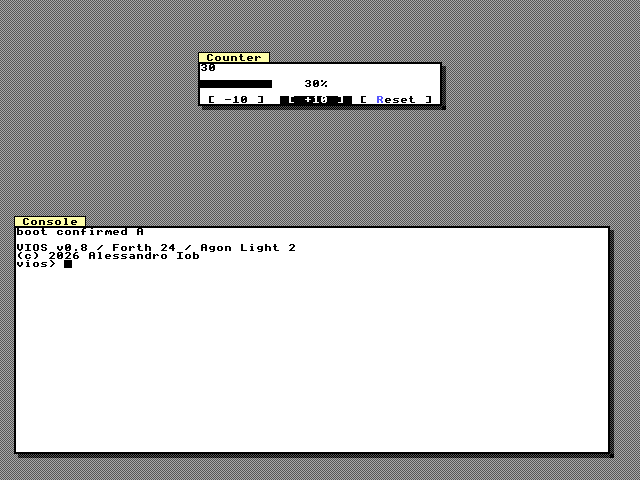
A settings form with a menu and an animation
A small form that changes the GUI itself: two radio buttons choose the style,
a check box sets the window snap, and choosing a row of the list slides the
window to the left, the centre or the right with a tween. It also defines two
commands: Quit with the accelerator Ctrl+Q (listed on the Turbo Vision status
line because it has the UI-STATUS flag) and Defaults, both in a pane menu
opened with Shift+F10.
- The radios share the parent box 22, so they form one group: selecting one
clears the other, and each selection sends
UI-EV-CHANGEwith value 1. - The check box sends
UI-EV-CHANGEwith its new value. - The list sends
UI-EV-SELECTwith the selected row;FMOVEanimates the window's x from where it is to the new place withUI-OUTeasing. - Commands arrive as
UI-EV-COMMANDwith the command id inarg. Ctrl+Q works whichever window has the focus, because accelerators are global. - Instead of taking the event apart on the stack,
EVENT?stores it in three variables andIS?compares kind and id. - Commands outlive windows, so
SETTINGSdisables its two commands when it ends; otherwise Ctrl+Q would keep sending events that nobody reads.
\ Settings: radios switch the style, a check box sets the snap, a list moves the window.
3 CONSTANT FWIN   2 CONSTANT FSURF
100 CONSTANT CMD-QUIT   101 CONSTANT CMD-DEFAULTS
VARIABLE FDONE   VARIABLE FX
VARIABLE KIND   VARIABLE WHO   VARIABLE ARG
: EVENT? ( -- flag )  UI-NEXT DUP IF >R ARG ! WHO ! KIND ! R> THEN ;
: IS? ( kind id -- flag )  WHO @ =  SWAP KIND @ =  AND ;
: FCOMMANDS ( -- )
  S" &Quit" CMD-QUIT UI-ENABLED UI-STATUS OR 0 UI-CTRL 113 UI-COMMAND
  S" &Defaults" CMD-DEFAULTS UI-ENABLED 0 0 0 UI-COMMAND
  CMD-DEFAULTS UI-SEPARATOR CMD-QUIT 3 S" Settings" 1 UI-MENU
  FWIN 1 UI-POPUP ;
: FDEFAULTS ( -- )  23 1 UI-WVALUE 0 UI-STYLE  25 1 UI-WVALUE 8 UI-SNAP ;
: FORM-OPEN ( -- )
  UI-BEGIN
  FSURF 34 10 48 UI-SURFACE
  288 FX !
  FWIN FSURF 288 48 34 10 UI-VISIBLE UI-DECOR OR UI-SHADOW OR UI-WINDOW
  S" Settings" FWIN UI-TITLE
  20 FWIN UI-BOX UI-NONE 0 0 0 0 UI-WF-FILL UI-WIDGET   20 UI-COLUMN 0 UI-LAYOUT
  21 FWIN UI-LABEL 20 0 0 0 0 0 UI-WIDGET   21 1 0 UI-WSIZE   S" Style" 21 UI-WTEXT
  22 FWIN UI-BOX 20 0 0 0 0 0 UI-WIDGET     22 2 0 UI-WSIZE   22 UI-COLUMN 0 UI-LAYOUT
  23 FWIN UI-RADIO 22 0 0 0 0 0 UI-WIDGET   S" S&malltalk" 23 UI-WTEXT
  24 FWIN UI-RADIO 22 0 0 0 0 0 UI-WIDGET   S" &Turbo Vision" 24 UI-WTEXT
  25 FWIN UI-CHECK 20 0 0 0 0 0 UI-WIDGET   25 1 0 UI-WSIZE   S" Snap windows to &8 px" 25 UI-WTEXT
  26 FWIN UI-LABEL 20 0 0 0 0 0 UI-WIDGET   26 1 0 UI-WSIZE   S" Position" 26 UI-WTEXT
  27 FWIN UI-LIST 20 0 0 0 0 0 UI-WIDGET    27 0 1 UI-WSIZE
  27 3 UI-ITEMS  S" Left" 27 0 UI-ITEM  S" Centre" 27 1 UI-ITEM  S" Right" 27 2 UI-ITEM  27 2 UI-WVALUE
  28 FWIN UI-BOX 20 0 0 0 0 0 UI-WIDGET     28 1 0 UI-WSIZE   28 UI-ROW 2 UI-LAYOUT
  29 FWIN UI-BUTTON 28 0 0 0 0 0 UI-WIDGET  S" &Close" 29 UI-WTEXT
  23 1 UI-WVALUE  25 1 UI-WVALUE
  FCOMMANDS
  FWIN UI-FOCUS
  UI-COMMIT ;
: FMOVE ( index -- )               \ slide the window to column 2, 19 or 36
  136 * 16 +  >R
  UI-TWEEN-WINDOW FWIN UI-X  FX @ R@  400 UI-OUT UI-ANIMATE
  R> FX ! ;
: FHANDLE ( -- )
  UI-EV-CHANGE 23 IS? IF 0 UI-STYLE THEN
  UI-EV-CHANGE 24 IS? IF 1 UI-STYLE THEN
  UI-EV-CHANGE 25 IS? IF ARG @ IF 8 ELSE 1 THEN UI-SNAP THEN
  UI-EV-SELECT 27 IS? IF ARG @ FMOVE THEN
  UI-EV-ACTIVATE 29 IS? IF TRUE FDONE ! THEN
  KIND @ UI-EV-COMMAND = IF
    ARG @ CMD-QUIT = IF TRUE FDONE ! THEN
    ARG @ CMD-DEFAULTS = IF FDEFAULTS THEN
  THEN
  UI-EV-WIN FWIN IS?  ARG @ 255 AND 2 =  AND IF TRUE FDONE ! THEN ;
: FSTEP ( -- )  BEGIN EVENT? WHILE FHANDLE REPEAT ;
: SETTINGS ( -- )
  FORM-OPEN  FALSE FDONE !
  BEGIN FSTEP 20 MS  FDONE @ UNTIL
  CMD-QUIT 0 UI-STATE  CMD-DEFAULTS 0 UI-STATE      \ disable Ctrl+Q again
  FWIN UI-CLOSE ;
SETTINGS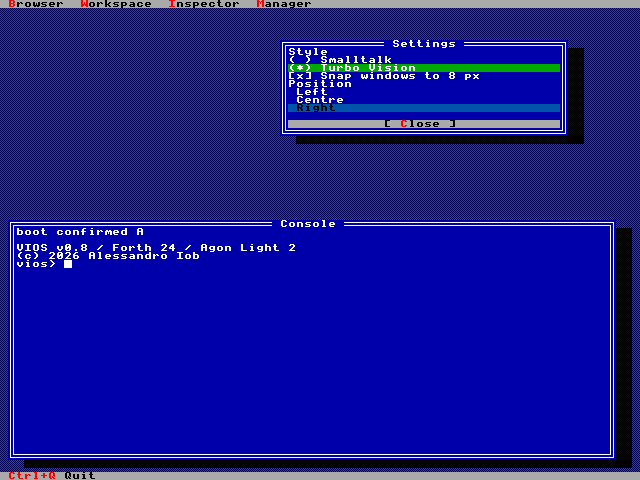
Both programs leave the window ids, surfaces and widget ids of the other untouched, so you can load them together; run one loop at a time.